Brenda Fricker Death and Legacy: The Life of a Legendary Actressp
Brenda Fricker: The Oscar-Winning Irish Actress Who Stole Hearts Worldwide

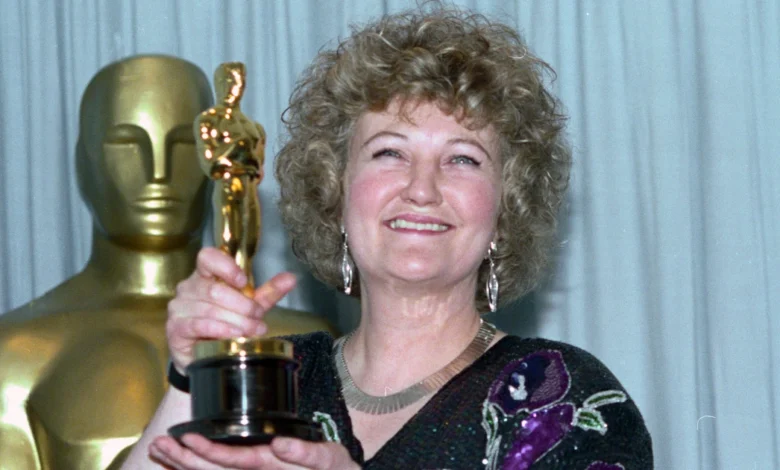
Brenda Fricker, one of Ireland’s most celebrated actresses, left an indelible mark on cinema and television over a remarkable six-decade career. From her groundbreaking Academy Award-winning performance in My Left Foot to her unforgettable role as the compassionate Pigeon Lady in Home Alone 2: Lost in New York, Fricker brought authenticity, warmth, and depth to every character she portrayed. She passed away on July 16, 2026, at the age of 81, leaving behind a rich legacy as the first Irish woman to win an Oscar.
This biography explores her inspiring journey from the streets of Dublin to Hollywood’s biggest stages celebrating a woman whose talent and resilience made her a true national treasure.
Early Life and Path to Acting
Brenda Fricker was born on February 17, 1945, in Dublin, Ireland. She grew up in a creative household; her mother, Bina (née Murphy), taught languages, while her father, Desmond Frederick Fricker, worked in the Department of Agriculture and was also a broadcaster and journalist for The Irish Times.
Before discovering acting, young Brenda worked as an assistant to the art editor at The Irish Times, dreaming of becoming a reporter. However, fate had other plans. She entered acting almost by chance and made her feature film debut with a small uncredited role in the 1964 film Of Human Bondage. Her early television work included appearances in Ireland’s first soap opera, Tolka Row, and a stint as Staff Nurse Maloney in the iconic British series Coronation Street.
Rise to Fame: The Oscar Moment
Brenda Fricker’s breakthrough came in 1989 with her powerful portrayal of Bridget Fagan Brown, the devoted mother of Christy Brown, in the biographical drama My Left Foot. Starring alongside Daniel Day-Lewis, Fricker delivered a performance filled with quiet strength and emotional depth.
In 1990, she made history by winning the Academy Award for Best Supporting Actress becoming the first Irish actress to achieve this honor. During her emotional acceptance speech, she thanked Christy Brown “just for being alive” and dedicated the Oscar to his mother, famously noting that “anybody who gives birth 22 times deserves one of these.”
The win opened doors to international projects. She reunited with director Jim Sheridan for The Field (1990) alongside Richard Harris and earned critical acclaim across the board.
Iconic Roles and Hollywood Success
Fricker became a familiar and beloved face to audiences worldwide through several memorable performances:
- Home Alone 2: Lost in New York (1992) As the Central Park Pigeon Lady, she brought warmth and humanity to a character who formed a touching friendship with Kevin McCallister. This role remains a holiday favorite for millions.
- So I Married an Axe Murderer (1993) Playing Mike Myers’ eccentric Scottish mother.
- Angels in the Outfield (1994) As the caring Maggie.
- A Time to Kill (1996) Appearing in the John Grisham adaptation.
- Veronica Guerin (2003) Portraying the mother of the fearless journalist.
She also delivered strong performances in Irish and British productions such as Inside I’m Dancing (2004), Cloudburst (2011) with Olympia Dukakis, and Albert Nobbs (2011). In her later years, she starred in Holding (2021) and the experimental drama The Swallow (2024).
Television Legacy and Stage Work
Beyond films, Fricker was widely known in the UK for her long-running role as Nurse Megan Roach in the BBC medical drama Casualty. She appeared in the series across multiple decades, becoming a fan favorite for her grounded and empathetic portrayal.
On stage, she performed at prestigious venues including the Royal National Theatre and Royal Court Theatre in London, showcasing her versatility in classics and contemporary plays.
Personal Life, Struggles, and Resilience
Brenda Fricker’s personal life was marked by both joy and profound challenges. She was married to Barry Davis from 1979 to 1988. The couple faced multiple miscarriages, and Davis passed away in 1990.
In her candid 2025 memoir She Died Young: A Life in Fragments, Fricker opened up about her battles with severe depression, childhood trauma, a serious cycling accident at age 14, and other hardships. Despite these struggles, she found solace in simple pleasures her dogs, Guinness, poetry, and even snooker, where she famously beat the entire crew of My Left Foot.
Her honesty and vulnerability in later years only deepened the public’s admiration for her strength and authenticity.
Death and Tributes
Brenda Fricker passed away peacefully in Dublin on July 16, 2026, following a period of ill health. She was 81 years old. Her agent described her as a “legend” and expressed deep sorrow at her loss.
Tributes poured in from across the entertainment world and beyond, remembering her not only as a trailblazing Oscar winner but as a kind, resilient, and deeply human artist whose performances touched generations.
Awards and Recognition
- Academy Award – Best Supporting Actress (My Left Foot, 1990)
- Los Angeles Film Critics Association Award
- Boston Society of Film Critics Award
- Maureen O’Hara Award (2008)
- Freedom of the City of Dublin (2026)
- Ranked 26th on The Irish Times list of greatest Irish film actors (2020)
Brenda Fricker’s Enduring Legacy
Brenda Fricker proved that great acting is about truth, empathy, and humanity. Whether playing a devoted mother, a lonely pigeon lady, or a resilient survivor, she brought Irish warmth and quiet power to the screen. Her career stands as a testament that talent, combined with authenticity, can transcend borders and generations.
As Ireland mourns one of its brightest stars, Fricker’s performances especially in My Left Foot and Home Alone 2 will continue to inspire actors and delight audiences for decades to come.
She will be remembered not just as Ireland’s first female Oscar winner, but as a woman who lived and performed with courage, dignity, and heart.
FAQs
1. When did Brenda Fricker die? Brenda Fricker passed away on July 16, 2026, at the age of 81 in Dublin, Ireland, after a period of ill health.
2. What is Brenda Fricker best known for? She is best known for winning the Academy Award for Best Supporting Actress for My Left Foot (1989) and for her iconic role as the Pigeon Lady in Home Alone 2: Lost in New York (1992).
3. Was Brenda Fricker the first Irish woman to win an Oscar? Yes. In 1990, she became the first Irish actress to win an Academy Award.
4. What other famous movies did Brenda Fricker appear in? Some of her notable films include The Field (1990), So I Married an Axe Murderer (1993), Angels in the Outfield (1994), A Time to Kill (1996), Veronica Guerin (2003), and Albert Nobbs (2011).
5. Did Brenda Fricker appear in any TV shows? Yes, she was widely loved for her long-running role as Nurse Megan Roach in the BBC series Casualty. She also appeared in Coronation Street, Holding (2021), and many other productions.
You May Also Read: Carolin Bacic